Car and garage · Which one do I need
OBD2 scanners for DIYers: code reader, scan tool or bidirectional
Code reader, scan tool or bidirectional? Name the job on your car, then stop at the step that covers it.
Quick picks who each one fits
We earn a commission if you buy through the Amazon links on this page, at no extra cost to you. Commissions never decide which products are listed or how they are described.
-
-
Step 1: codes, live data, readiness check
-

BlueDriver Pro Bluetooth scan tool (LSB2)
Step 2: phone-based, with repair reports
- ABS and SRS codes: Yes
- Bluetooth named: Yes
-

FOXWELL NT604 Elite handheld scanner
Step 2: four systems on a handheld
- ABS and SRS codes: Yes
- Bidirectional tests: No
- Service resets: None
-

Step 3: oil light reset, all-system scan
- ABS and SRS codes: Yes
- Bidirectional tests: No*
- Bluetooth named: Yes
-

Step 3: four systems and 6 named resets
- ABS and SRS codes: Yes
- Service resets: 6
-

XTOOL A30M bidirectional scan tool
Step 4: active tests, 26+ service functions
- ABS and SRS codes: Yes
- Bidirectional tests: Yes
- Service resets: 26
Figures are as stated in each product's current Amazon listing; * from the maker's own spec page (see Sources). Yes or No: whether the listing or maker names the feature.
On this page
What we compared and why
- The job you want to do. Reading a check engine code, reading an ABS light, resetting an oil light and commanding a part to run are four different jobs. Each step up the ladder adds one.
- Which systems it reads. A code reader covers engine and emissions codes. ABS and airbag (SRS) lights need a tool that says it reads them, and coverage varies by vehicle.
- Bidirectional tests. These send a command to the car, for example to run a fuel pump, so you can watch the result. Most DIY jobs do not need them; some diagnoses do.
- Handheld or phone. A Bluetooth tool uses your phone as the screen; a handheld has its own. Neither is automatically the better fit.
The models compared
| Model | ABS and SRS codes | Bidirectional tests | Service resets | Bluetooth named | Amazon link |
|---|---|---|---|---|---|
| ANCEL AD310 code reader | No | Not stated in listing | Not stated in listing | Not stated in listing | See on Amazon |
| Autel AL319 code reader | Not stated in listing | Not stated in listing | Not stated in listing | Not stated in listing | See on Amazon |
| BlueDriver Pro Bluetooth scan tool (LSB2) | Yes | Not stated in listing | Not stated in listing | Yes | See on Amazon |
| FOXWELL NT604 Elite handheld scanner | Yes | No | None | Not stated in listing | See on Amazon |
| Innova 5410 scan tool | Yes | No* | Not stated in listing | Yes | See on Amazon |
| TOPDON ArtiDiag500 scan tool | Yes | Not stated in listing | 6 | Not stated in listing | See on Amazon |
| XTOOL A30M bidirectional scan tool | Yes | Yes | 26 | Yes | See on Amazon |
Read at this page's build and converted to one unit by us; sources as in the key above. "Not stated in listing": the listing does not give it. "Listing gives two values": it states two, so we show neither.
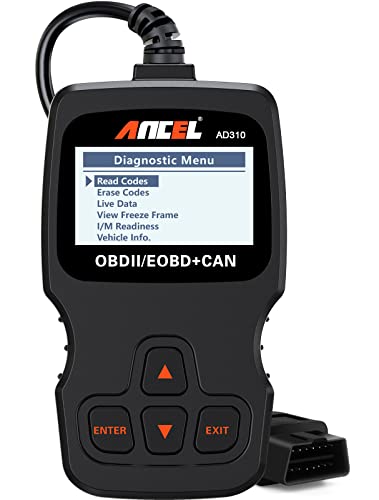
ANCEL AD310 code reader
Who it fits: Check engine lights on 1996-and-newer OBD2 vehicles: read and clear codes, with a screen and cable and nothing to pair.
Skip it if: You have an ABS or airbag light; its listing says it only supports emission-related issues.
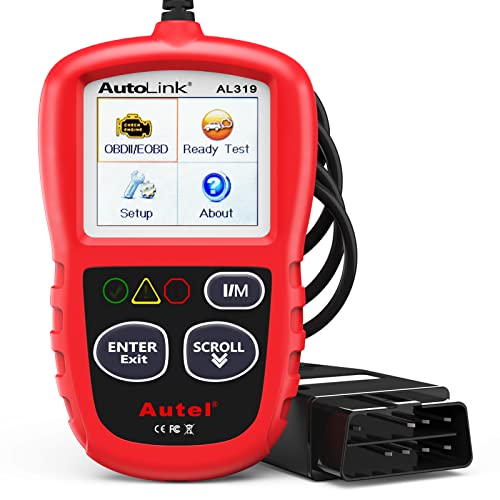
Autel AL319 code reader
Who it fits: The same step, with live data, freeze frame and a one-click readiness check named in its listing, plus a color display.
Skip it if: You have an ABS or airbag light; the listing's functions are OBD2 engine functions.
BlueDriver Pro Bluetooth scan tool (LSB2)
Who it fits: You would rather use your phone as the screen, and want reports matched to each code; BlueDriver says enhanced systems depend on make.
Skip it if: You want a tool with its own screen, or you plan to run service resets; BlueDriver's page describes neither for this model.
FOXWELL NT604 Elite handheld scanner
Who it fits: Engine, ABS, SRS and transmission codes on a handheld, with no phone involved.
Skip it if: You want service resets; its listing says it does not support them.
Innova 5410 scan tool
Who it fits: All-system scan and an oil light reset, per Innova's chart, with a guided app and a coverage checker for your vehicle.
Skip it if: You need bidirectional tests; Innova's chart gives them to the 5610, not this 5410.
TOPDON ArtiDiag500 scan tool
Who it fits: Four-system codes plus six named resets, oil, throttle, SAS, TPMS, BMS and EPB, on a 5 in. handheld.
Skip it if: You need bidirectional tests; neither the listing nor TOPDON's spec table states them for this model.
XTOOL A30M bidirectional scan tool
Who it fits: You diagnose beyond reading codes and want to command parts to run; XTOOL names active tests, full-system scan and 26+ service functions.
Skip it if: Your job is a check engine light; you would not use most of this, and it depends on a phone or tablet app.
The ladder
"Scanner" is used for all of these, which is why they are hard to compare. Think of four steps, each adding one job to the one before. Name the job you need, and stop at that step. This page is research-based, from makers' pages and current listings; we have not plugged these tools into a car.
| Step | The job it adds | What to look for in a listing | Rows here |
|---|---|---|---|
| 1. Code reader | Read and clear check engine codes; emissions readiness | "OBD2", "check engine", "I/M readiness" | ANCEL AD310, Autel AL319 |
| 2. Multi-system scan tool | Read ABS and airbag (SRS), often transmission | Those systems named, plus vehicle coverage | BlueDriver, FOXWELL NT604 Elite |
| 3. Service-function tool | Resets after maintenance, such as an oil light or a battery | The resets named one by one | Innova 5410, TOPDON ArtiDiag500 |
| 4. Bidirectional tool | Command a part to run, to test it | "Bidirectional" or "active test", with coverage for your car | XTOOL A30M |
Code reader vs scan tool
The plain difference is how much of the car it talks to. The listings here give 1996 as the start of OBD2 on US vehicles: the same port and a common set of engine and emissions data, which is what a code reader reads. The ANCEL listing is explicit about the limit: it only supports the diagnosis of emission-related issues. A scan tool adds the other computers in the car, such as ABS and airbag. These are not part of that common set, so coverage depends on your make, model and year.
So if your light is the check engine light, step 1 reads it. If it is an ABS or airbag light, a step 1 tool will not help, however good it is at step 1.
What each step does not do
Clearing a code is not a repair. It turns the light off until the fault sets it again. Every step, including step 1, can clear a code, and it can also erase freeze-frame data that a mechanic would use, so read and note the code first.
A named reset is not every reset. The FOXWELL listing says outright that the NT604 Elite does not support service functions such as an oil reset, battery registration or ABS bleeding. The TOPDON listing names six. XTOOL's page says 26+, so count the ones you need instead of the total.
Bidirectional is not universal. Innova writes that some buyers assumed a tool with bidirectional features could do all of them on all vehicles, and that this is not the case. XTOOL's A30M states bidirectional control, and which tests actually run still depends on your car. Check the maker's coverage tool for your exact year, make, model and engine before you rely on this step.
A decision tree
- Is it the check engine light, and do you just want to know what it means? Step 1.
- Is it an ABS, airbag or transmission light? Step 2, once you have checked your vehicle's coverage.
- Do you do your own oil changes, batteries or brakes, and does the car need a reset afterwards? Step 3, for the resets it names.
- Do you already diagnose and repair, and do you want to test a part without removing it? Step 4.
- Does the screen matter? A handheld keeps everything in one box; a phone-based tool uses a screen you already own and relies on an app. For that choice among three popular tools, see BlueDriver vs FOXWELL vs TOPDON.
Check each step against your vehicle before you buy. Coverage is the one thing no general guide can settle.
Reading the table
"Yes" means the current listing names the feature, and "No" or "None" means the listing itself states the limit. A mark on the Innova row means the value comes from Innova's comparison chart, linked under Sources. "Not stated in listing" means the listing does not name it, which is not the same as the tool being unable to do it. "Bluetooth named" means the listing mentions Bluetooth or BT. "Service resets" is the count a listing states, and most do not state one.
What this page does not tell you
We have not used these tools on a vehicle, and we do not rank them. We do not confirm coverage for your car, or tell you whether a code means a part has failed. Follow the tool maker's instructions and your vehicle's service manual for any test or reset.